 MoP
MoP WotLK
WotLK Cata
Cata Vanilla
 TBC
TBCDescription
What is XLoot?
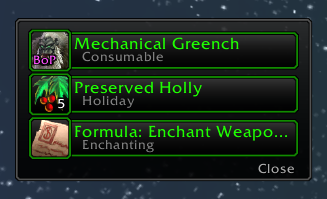
XLoot replaces the default loot window with a cleaner, more functional frame featuring item quality borders, auto-looting options, group loot improvements, and loot history tracking.
Categorized under Bags & Inventory, this addon is a must-have for players seeking to improve their World of Warcraft experience on private servers.
Key Features
- Redesigned loot frame with item quality colored borders and improved layout
- Auto-loot with per-quality threshold for automatic pickup of specified item tiers
- Group loot frame improvements with larger icons and quality indicators
- Loot history panel recording all items looted during a session
- Cursor anchored loot frame positioning for grab-and-go looting
- Auto-close on empty to dismiss the loot window when everything has been taken
- Skinnable frame appearance with texture and font customization
- Chat output formatting for loot announcement messages
Why XLoot is Essential
The default loot window is a small, plain frame that gives no visual indication of item quality and requires precise clicking. XLoot makes looting faster and more informative with quality-colored borders that let you instantly identify valuable drops, cursor anchoring that puts the loot right where your mouse already is, and history tracking so you never wonder what you picked up.
Supported Expansions
XLoot is available for MoP, WotLK, Cataclysm, Classic, and TBC. Whether you play on a Classic private server or a modern expansion realm, this addon enhances your gameplay across all supported versions.
How to Install XLoot
Place XLoot in your AddOns directory. The improved loot frame appears automatically. Type /xloot to configure frame positioning, auto-loot thresholds, and loot history display preferences.
Browse more WoW addons and find the best private servers on DivineTop.