 TBC
 WotLK
 Cata
 MoP
Description
What is X-Perl UnitFrames?
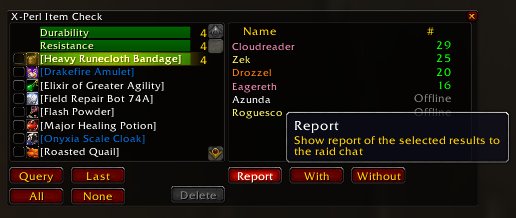
X-Perl UnitFrames is a comprehensive unit frame replacement featuring 3D portraits, extensive raid frame options, click-casting support, range checking, and a highly configurable layout system.
Categorized under Unit Frames, this addon is a must-have for players seeking to improve their World of Warcraft experience on private servers.
Key Features
- 3D animated portraits on player, target, and party frames
- Raid frames with configurable grid density and buff/debuff indicators
- Click-to-cast support for healing directly from raid frames
- Range checking with frame fading for out-of-range players
- Target highlighting showing which raid members are being targeted by bosses
- Buff and debuff scaling with priority-based display filtering
- Extensive color customization for health bars, borders, and backgrounds
- MT target window showing threat targets for multiple tanks
Why X-Perl UnitFrames is Essential
X-Perl became the dominant unit frame addon through the WotLK and Cataclysm eras because it offered everything in one package: attractive 3D portraits for immersion, functional raid frames for healers, and enough configuration to satisfy power users. It remains popular on private servers where players want a battle-tested, full-featured frame solution.
Supported Expansions
X-Perl UnitFrames is available for Cataclysm, WotLK, MoP, and TBC. Whether you play on a Classic private server or a modern expansion realm, this addon enhances your gameplay across all supported versions.
How to Install X-Perl UnitFrames
Extract all X-Perl modules into your AddOns folder. Type /xperl to access the full configuration panel. Start with the player and target frame settings, then customize party and raid frames to your role's needs.
Browse more WoW addons and find the best private servers on DivineTop.