 MoP
MoP WoD
WoD WotLK
WotLK Cata
Cata Legion
 Vanilla
 TBC
TBCDescription
What is Scrolling Combat Text?
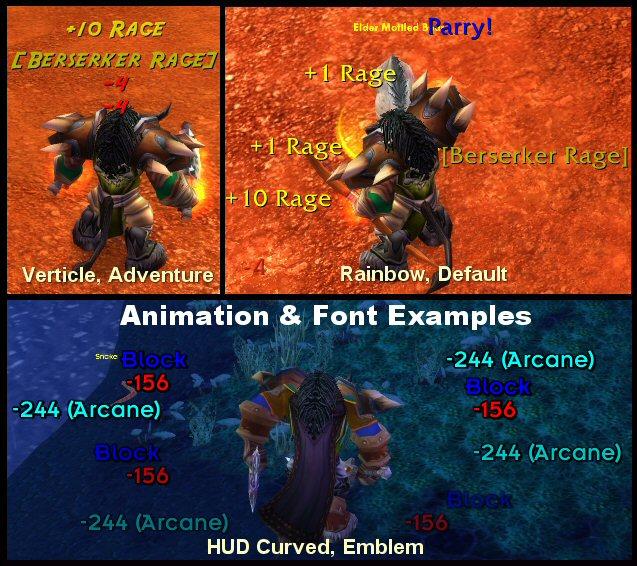
Scrolling Combat Text (SCT) is a combat feedback addon that replaces the default floating combat numbers with highly customizable scrolling text showing damage dealt, damage taken, heals, and combat events.
Categorized under Combat, this addon is a must-have for players seeking to improve their World of Warcraft experience on private servers.
Key Features
- Customizable scrolling text for incoming damage, outgoing damage, and healing
- Multiple animation styles including vertical scroll, arc, rainbow, and sprinkler
- Critical hit emphasis with enlarged text and custom colors
- Event filtering to display only the combat information you care about
- Spell school coloring using distinct colors for physical, fire, frost, shadow, and other damage types
- Sticky text for important events like killing blows and skill procs
- Custom trigger system for displaying alerts on specific combat events
- Font, size, speed, and direction customization for each text category
Why Scrolling Combat Text is Essential
The default floating combat text in WoW is limited and difficult to customize. SCT gives you full control over how combat information is presented, from the animation style to which events appear. Players who focus on visual feedback rather than meter addons find SCT invaluable for understanding combat flow and reacting to procs and critical events in real time.
Supported Expansions
Scrolling Combat Text is available for MoP, WoD, WotLK, Cataclysm, Legion, Classic, and TBC. Whether you play on a Classic private server or a modern expansion realm, this addon enhances your gameplay across all supported versions.
How to Install Scrolling Combat Text
Place the ScrollingCombatText folder in your AddOns directory. Type /sct to open the configuration menu. Set up separate profiles for incoming and outgoing damage, and experiment with animation styles to find your preference.
Browse more WoW addons and find the best private servers on DivineTop.