 Vanilla
Description
What is Questie?
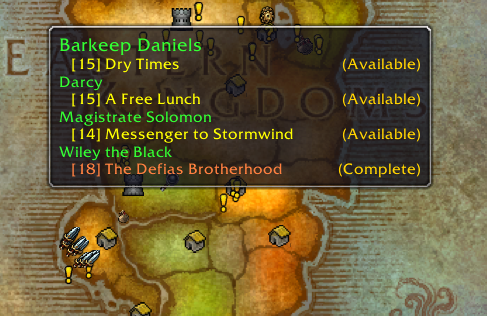
Questie is the definitive quest helper for Classic Vanilla WoW, displaying available quests, objective locations, and turn-in points on your world map and minimap with an extensive built-in quest database.
Categorized under Map & Minimap, this addon is a must-have for players seeking to improve their World of Warcraft experience on private servers.
Key Features
- World map and minimap icons for available quest givers marked by level and type
- Objective tracking markers showing mob spawn areas, item locations, and exploration zones
- Quest turn-in markers guiding you back to NPCs for reward collection
- Comprehensive built-in database covering every Vanilla quest
- Quest tooltip information showing rewards, requirements, and chain prerequisites
- Party quest sharing displaying objectives needed by group members
- Journey log tracking your completed quest history across all zones
- Minimap icon filtering to reduce clutter in quest-dense areas
Why Questie is Essential
Questie is the most popular addon on Classic Vanilla private servers for good reason. Leveling from 1 to 60 without quest markers is a 200+ hour journey of alt-tabbing to database websites. Questie cuts this dramatically by showing you where to go, which quests are available at your level, and how quest chains connect. It makes the vast Classic world navigable.
Supported Expansions
Questie is available for Classic. Whether you play on a Classic private server or a modern expansion realm, this addon enhances your gameplay across all supported versions.
How to Install Questie
Extract the Questie folder into your AddOns directory. Quest markers appear immediately on your map. Type /questie to configure icon sizes, level range filtering, and tracker display options.
Browse more WoW addons and find the best private servers on DivineTop.