
 Vanilla
 TBC
Description
What is pfQuest?
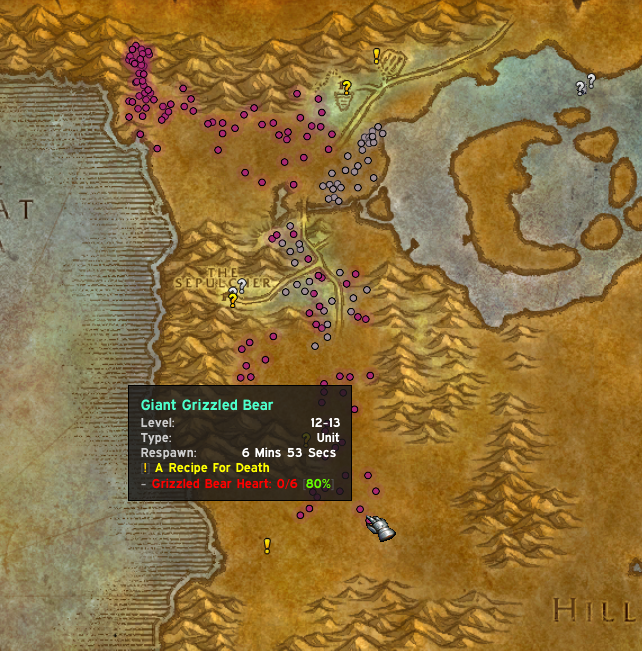
pfQuest is a quest helper addon for Vanilla and TBC that marks available quest givers, quest objectives, and turn-in locations directly on your world map and minimap without requiring an external database download.
Categorized under Map & Minimap, and Miscellaneous, this addon is a must-have for players seeking to improve their World of Warcraft experience on private servers.
Key Features
- Available quest markers showing NPCs with quests you have not yet accepted
- Objective location markers pinpointing where to find quest mobs, items, and areas
- Turn-in NPC markers for completed quests ready for reward collection
- Built-in quest database requiring no external data files or downloads
- Minimap arrow navigation pointing toward the nearest quest objective
- Level-appropriate quest filtering hiding quests too high or too low for you
- Quest tracking integration with the default quest log
- Flight master and vendor location markers for convenience
Why pfQuest is Essential
Vanilla and TBC WoW provide almost no guidance on where to complete quests. Without a quest helper, players spend more time reading Thottbot guides than actually playing the game. pfQuest embeds this knowledge directly into your map, dramatically speeding up the leveling process while still letting you discover the quest stories organically.
Supported Expansions
pfQuest is available for Classic, and TBC. Whether you play on a Classic private server or a modern expansion realm, this addon enhances your gameplay across all supported versions.
How to Install pfQuest
Drop pfQuest into your AddOns directory. Quest markers appear automatically on your world map and minimap. Type /pfquest to adjust marker visibility, level range filters, and database options.
Browse more WoW addons and find the best private servers on DivineTop.