
 Vanilla
 TBC
 BfA
Description
What is Outfitter?
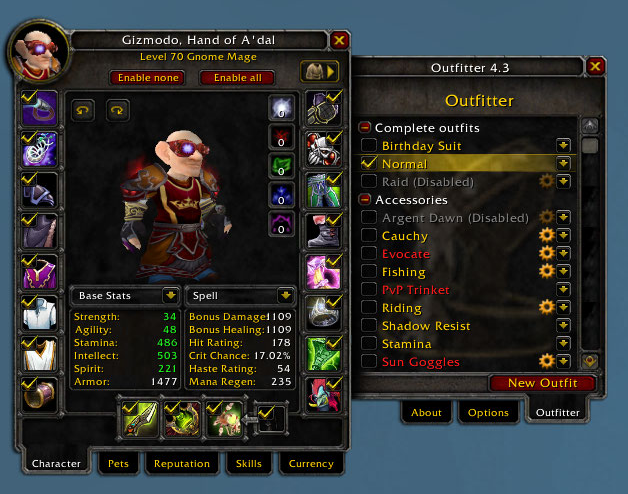
Outfitter is a gear set management addon that saves equipment configurations and automatically swaps between them based on events like entering a battleground, mounting, changing spec, or fishing.
Categorized under Bags & Inventory, and PvP, this addon is a must-have for players seeking to improve their World of Warcraft experience on private servers.
Key Features
- Named gear set profiles storing complete equipment configurations
- Event-based automatic gear swapping for PvP, fishing, riding, and more
- One-click set equipping through the Outfitter panel or key bindings
- Set comparison showing stat differences between saved outfits
- Conditional rules for automatic swapping when entering specific zones or activities
- Incomplete set warnings when saved items are in your bank instead of bags
- Banker integration for retrieving set items when visiting the bank
- Script support for advanced conditional gear swapping logic
Why Outfitter is Essential
Players frequently switch between PvP gear, PvE sets, resistance equipment, and farming outfits. Manually swapping a dozen gear slots every time you enter a battleground or join a raid wastes time and risks forgetting a piece. Outfitter automates the entire process, ensuring you always have the right gear equipped for the right situation.
Supported Expansions
Outfitter is available for BFA, Classic, and TBC. Whether you play on a Classic private server or a modern expansion realm, this addon enhances your gameplay across all supported versions.
How to Install Outfitter
Install Outfitter to your AddOns folder. Open the panel from your character frame or with /outfitter. Create your first set by equipping desired gear and clicking Save. Set up automatic rules in the Scripts tab.
Browse more WoW addons and find the best private servers on DivineTop.