 DF
DF BfA
BfA MoP
MoP WoD
WoD SL
SL WotLK
WotLK Cata
Cata Legion
 Vanilla
 TBC
TBCDescription
What is OmniCC?
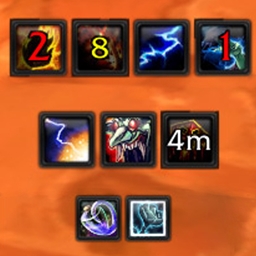
OmniCC adds numerical cooldown countdown text directly onto your action bar buttons, inventory items, and buff icons, replacing the default clock-sweep animation with precise time remaining.
Categorized under Combat, and Action Bars, this addon is a must-have for players seeking to improve their World of Warcraft experience on private servers.
Key Features
- Numerical cooldown text overlaid on action bar buttons showing exact seconds remaining
- Color-coded time display shifting from red (short) to yellow to white (long) as cooldowns progress
- Cooldown tracking on inventory items, pet bars, and stance buttons
- Buff and debuff icon cooldown text integration
- Minimum duration threshold to avoid cluttering the GCD with numbers
- Font, size, and position customization for cooldown text
- Pulse animation when cooldowns finish drawing attention to ready abilities
- Compatible with action bar addons including Bartender, Dominos, and ElvUI
Why OmniCC is Essential
The default cooldown animation is a shrinking dark overlay that is nearly impossible to read precisely. OmniCC replaces guesswork with exact numbers, letting you know that your interrupt is ready in 2.3 seconds or your major cooldown finishes in 47 seconds. This precision is critical for ability rotation optimization and reactive gameplay in both PvE and PvP.
Supported Expansions
OmniCC is available for Dragonflight, BFA, MoP, WoD, Shadowlands, WotLK, Cataclysm, Legion, Classic, and TBC. Whether you play on a Classic private server or a modern expansion realm, this addon enhances your gameplay across all supported versions.
How to Install OmniCC
Place OmniCC in your AddOns folder. Cooldown text appears immediately on all buttons. Type /omnicc to customize font, colors, minimum duration threshold, and the finished cooldown pulse effect.
Browse more WoW addons and find the best private servers on DivineTop.