
 Vanilla
Description
What is MobHealth3?
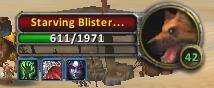
MobHealth3 displays estimated numerical health values for enemies in Classic Vanilla WoW, where the default UI only shows health as a percentage bar without actual numbers.
Categorized under Combat, and Unit Frames, this addon is a must-have for players seeking to improve their World of Warcraft experience on private servers.
Key Features
- Estimated current and maximum health display on target frames
- Progressive accuracy improvement as the addon records damage and health changes
- Shared database building more accurate estimates from multiple combat encounters
- Tooltip integration showing health estimates when hovering over mobs
- Party member data sharing for faster database population
- Boss health tracking critical for timing phase transitions and execute ranges
- Nameplate health value display for enemies in the game world
- Persistent database saved between sessions for growing accuracy over time
Why MobHealth3 is Essential
Vanilla WoW intentionally hides exact mob health values, showing only a percentage bar. This makes it impossible to time execute abilities, plan DPS cooldowns for phase transitions, or estimate how long a pull will take. MobHealth3 solves this by statistically estimating health values from combat data, and its accuracy improves every time you fight the same enemy.
Supported Expansions
MobHealth3 is available for Classic. Whether you play on a Classic private server or a modern expansion realm, this addon enhances your gameplay across all supported versions.
How to Install MobHealth3
Place MobHealth3 in your AddOns directory. Health estimates appear automatically on your target frame. The database starts empty and grows more accurate with each combat encounter, so expect rough estimates initially.
Browse more WoW addons and find the best private servers on DivineTop.