
 Vanilla
Description
What is KLHThreatMeter?
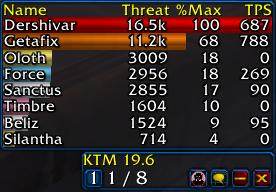
KLHThreatMeter (KTM) is the definitive threat monitoring addon for Classic Vanilla WoW, calculating and displaying real-time threat values for all party and raid members against the current target.
Categorized under Combat, and Boss Encounters, this addon is a must-have for players seeking to improve their World of Warcraft experience on private servers.
Key Features
- Real-time threat calculation based on damage dealt, healing generated, and threat modifiers
- Raid-wide threat synchronization through addon-to-addon communication
- Percentage-based threat display showing how close DPS are to pulling aggro
- Tank threat tracking helping warriors monitor their Sunder Armor and Heroic Strike threat
- Threat modifiers accounting for Salvation, Fade, Feint, and other threat reduction abilities
- Master target system for coordinating threat on a specific mob
- Warning alerts when approaching the aggro threshold
- Lightweight design optimized for the Classic WoW addon API
Why KLHThreatMeter is Essential
In Vanilla WoW there is no built-in threat display, and pulling aggro from the tank usually means instant death. KTM is the essential communication layer between tanks and DPS, allowing damage dealers to push their output right to the threat ceiling without crossing it. Every serious Classic raiding guild requires KTM for coordinated encounters.
Supported Expansions
KLHThreatMeter is available for Classic. Whether you play on a Classic private server or a modern expansion realm, this addon enhances your gameplay across all supported versions.
How to Install KLHThreatMeter
Install KLHThreatMeter in your AddOns folder. All raid members must have the addon installed for accurate data sharing. The threat window appears automatically when you enter combat with a target.
Browse more WoW addons and find the best private servers on DivineTop.