
 Vanilla
 TBC
Description
What is Grimoire Keeper?
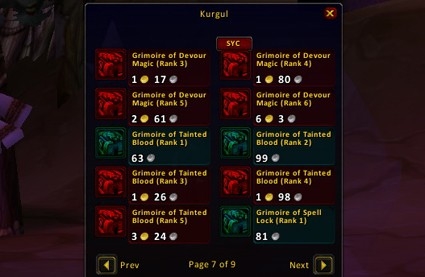
Grimoire Keeper is a Warlock-specific addon that manages your demon pet grimoire, tracking which spell ranks your summoned demons have learned and which grimoire items you still need to purchase.
Categorized under Miscellaneous, this addon is a must-have for players seeking to improve their World of Warcraft experience on private servers.
Key Features
- Complete grimoire checklist showing learned and unlearned pet spell ranks
- Demon-specific tabs for Imp, Voidwalker, Succubus, and Felhunter abilities
- Vendor integration highlighting which grimoire items are available at your current location
- Missing spell alerts notifying you when you reach a level to learn new pet abilities
- Cost tracking showing total gold needed to complete your grimoire collection
- Training progress display with percentage completion per demon
- Quick reference for pet spell rank requirements by player level
- Compact tooltip summaries when hovering over grimoire items at vendors
Why Grimoire Keeper is Essential
Vanilla and TBC Warlocks must manually visit demon trainers and purchase individual grimoire items to teach their pets new spell ranks. Missing a rank means your demon is weaker than it should be, and the sheer number of spells across four demons makes tracking progress nearly impossible without help. Grimoire Keeper ensures no pet ability goes unlearned.
Supported Expansions
Grimoire Keeper is available for Classic, and TBC. Whether you play on a Classic private server or a modern expansion realm, this addon enhances your gameplay across all supported versions.
How to Install Grimoire Keeper
Place Grimoire Keeper in your AddOns folder. Open the grimoire panel with /grimoire. Visit a demon trainer to automatically update your learned spell database.
Browse more WoW addons and find the best private servers on DivineTop.