
 TBC
 WotLK
Description
What is GearScoreLite?
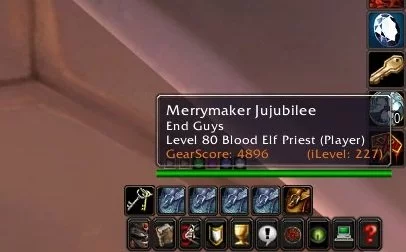
GearScoreLite calculates a numerical gear score for any player character based on their equipped item levels and slot weights, displaying the result in tooltips and inspection windows for quick evaluation.
Categorized under Tooltip, Miscellaneous, and Libraries, this addon is a must-have for players seeking to improve their World of Warcraft experience on private servers.
Key Features
- Automatic gear score calculation based on equipped item quality and level
- Tooltip integration showing gear scores when hovering over player characters
- Inspection window gear score display with per-slot breakdown
- Color-coded score ranges from green (undergeared) to orange (well-geared)
- Lightweight calculation algorithm designed to minimize performance impact
- Chat integration displaying gear score alongside player names in messages
- Guild roster gear score scanning for raid roster planning
- Score comparison showing how your gear stacks up against inspected players
Why GearScoreLite is Essential
On WotLK and TBC private servers, GearScore became the universal shorthand for evaluating player readiness for raid content. Love it or hate it, group leaders use it as a quick filter when forming PUG raids. Having GearScoreLite installed means you can see the scores others are evaluating you by and make informed decisions about which groups to join.
Supported Expansions
GearScoreLite is available for WotLK, and TBC. Whether you play on a Classic private server or a modern expansion realm, this addon enhances your gameplay across all supported versions.
How to Install GearScoreLite
Extract GearScoreLite to your AddOns folder. Scores appear automatically on player tooltips and inspection frames. No configuration is required, but type /gearscorelite to adjust display preferences.
Browse more WoW addons and find the best private servers on DivineTop.