 Vanilla
Description
What is EquipCompare?
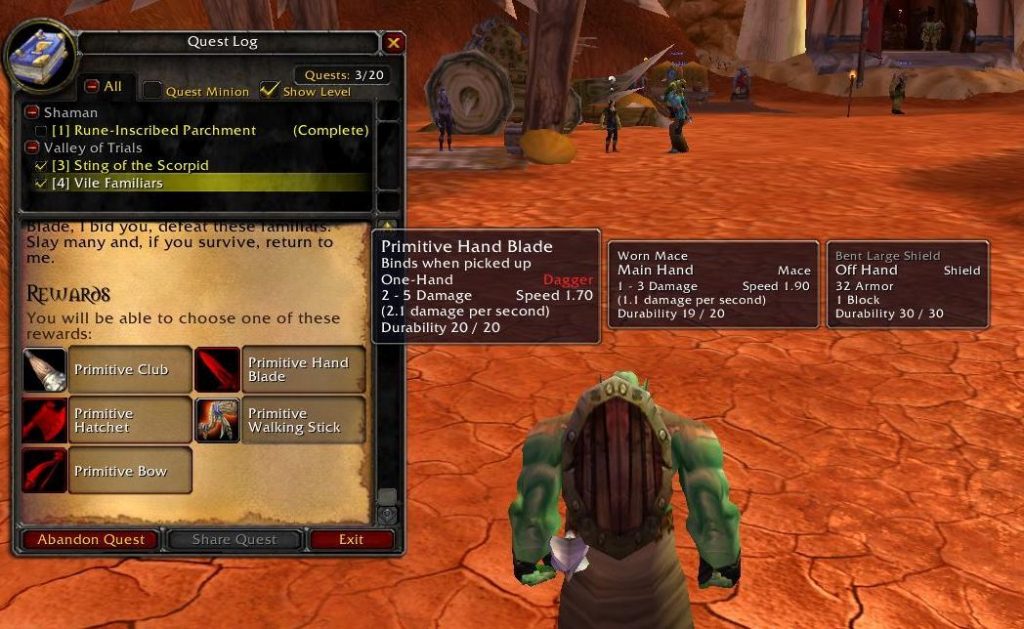
EquipCompare adds a side-by-side item comparison tooltip that automatically shows your currently equipped item next to any item you hover over, making gear upgrade decisions instant.
Categorized under Bags & Inventory, Tooltip, and Miscellaneous, this addon is a must-have for players seeking to improve their World of Warcraft experience on private servers.
Key Features
- Automatic side-by-side tooltip display comparing hovered items with equipped gear
- Support for dual-slot comparisons showing both trinkets or rings when relevant
- Integration with auction house, mail, trade, and vendor windows
- Stat difference highlighting showing gains and losses between items
- Shift-key toggle to enable or disable comparison on the fly
- Chat link comparison support for items linked in chat channels
- Compatible with item tooltip addons that modify tooltip content
- Quest reward comparison showing equipped items alongside reward choices
Why EquipCompare is Essential
Vanilla WoW lacks the built-in item comparison that later expansions added. Every gear decision requires manually opening your character panel, finding the slot, and mentally comparing stats. EquipCompare eliminates this tedious process by instantly showing both items side by side, which is especially valuable when choosing between quest rewards or evaluating dungeon drops.
Supported Expansions
EquipCompare is available for Classic. Whether you play on a Classic private server or a modern expansion realm, this addon enhances your gameplay across all supported versions.
How to Install EquipCompare
Drop EquipCompare into your Interface/AddOns folder. The comparison tooltip activates automatically. Hold Shift to temporarily disable comparisons when browsing items you do not intend to equip.
Browse more WoW addons and find the best private servers on DivineTop.