 DF
DF BfA
BfA MoP
MoP WoD
WoD SL
SL WotLK
WotLK Cata
Cata Legion
 Vanilla
 TBC
TBCDescription
What is Elkano’s BuffBars?
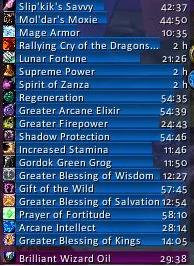
Elkano's BuffBars replaces the default buff icon display with horizontal timer bars showing the remaining duration of every buff and debuff on your character in a clean, sortable layout.
Categorized under Buffs & Debuffs, and Combat, this addon is a must-have for players seeking to improve their World of Warcraft experience on private servers.
Key Features
- Horizontal timer bars for all active buffs with remaining time displayed numerically
- Separate bar groups for buffs, debuffs, weapon enchants, and tracking abilities
- Color-coding by buff type with customizable color assignments
- Sorting options by duration, name, or buff category
- Bar width, height, and texture customization with SharedMedia support
- Click-to-cancel functionality for removing unwanted buffs quickly
- Target debuff bars showing what effects you have applied to your target
- Configurable maximum bar count to prevent screen clutter during raid buffing
Why Elkano’s BuffBars is Essential
Buff icons with tiny countdown numbers are nearly impossible to read during combat. BuffBars converts them to horizontal progress bars that you can monitor at a glance, making it trivial to see when your Flask of the Titans is expiring or when a crucial proc has seconds left. Particularly valuable for buff-heavy classes managing multiple short-duration effects.
Supported Expansions
Elkano’s BuffBars is available for Dragonflight, BFA, MoP, WoD, Shadowlands, WotLK, Cataclysm, Legion, Classic, and TBC. Whether you play on a Classic private server or a modern expansion realm, this addon enhances your gameplay across all supported versions.
How to Install Elkano’s BuffBars
Install to your AddOns folder. Type /buffbars to configure. Drag anchor points to position the buff and debuff bar groups separately. Adjust bar dimensions and sorting preferences in the options panel.
Browse more WoW addons and find the best private servers on DivineTop.