 DF
DF MoP
MoP WoD
WoD WotLK
WotLK Cata
Cata Legion
 Vanilla
 TBC
TBCDescription
What is EavesDrop?
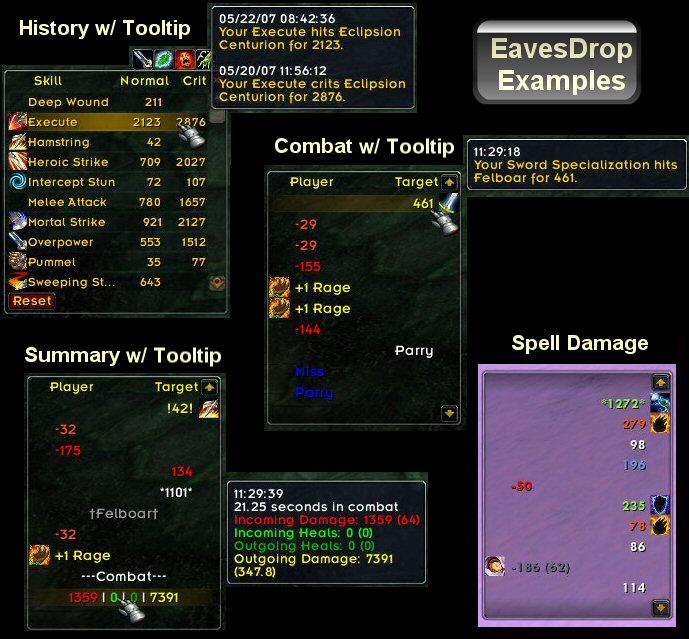
EavesDrop is a combat log viewer that presents incoming and outgoing damage, healing, and other combat events in a clean scrolling text display, replacing the cluttered default combat log.
Categorized under Combat, and Miscellaneous, this addon is a must-have for players seeking to improve their World of Warcraft experience on private servers.
Key Features
- Scrolling combat text display showing damage dealt and received in separate columns
- Color-coded entries distinguishing between physical damage, spell schools, and healing
- Filtering options to show only specific event types like crits, misses, or heals
- Configurable history buffer letting you scroll back through recent combat events
- Font, size, and frame customization for seamless UI integration
- Outgoing and incoming damage separation for clear visual parsing
- Skill and spell name display alongside damage numbers for ability identification
- Minimal resource usage compared to parsing the full combat log
Why EavesDrop is Essential
The default combat log floods you with irrelevant information from every player in range. EavesDrop filters this down to just your personal combat interactions, presented in an easy-to-read scrolling format. At a glance you can see your biggest hits, track incoming damage patterns, and identify which abilities are performing well.
Supported Expansions
EavesDrop is available for Dragonflight, MoP, WoD, WotLK, Cataclysm, Legion, Classic, and TBC. Whether you play on a Classic private server or a modern expansion realm, this addon enhances your gameplay across all supported versions.
How to Install EavesDrop
Place the EavesDrop folder in your AddOns directory. Use /eavesdrop to open the options panel. Drag the frame to your preferred position and adjust width, height, font size, and event filters.
Browse more WoW addons and find the best private servers on DivineTop.