
 TBC
 WotLK
 Cata
 MoP
Description
What is DrDamage?
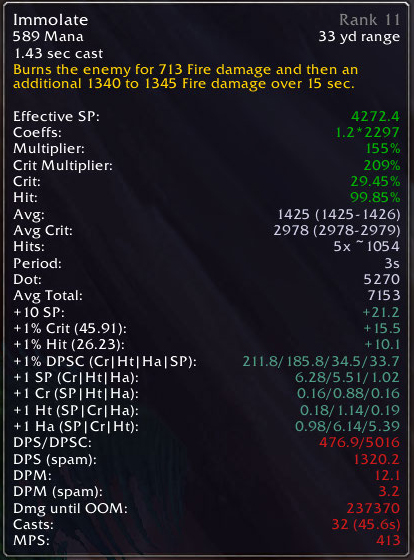
DrDamage is a theorycrafting addon that calculates and overlays predicted damage and healing values directly onto your action bar buttons, accounting for your current stats, buffs, and talent build.
Categorized under Combat, this addon is a must-have for players seeking to improve their World of Warcraft experience on private servers.
Key Features
- Damage and healing predictions displayed as text overlays on action bar icons
- Calculations factor in spell power, attack power, critical chance, and hit rating
- Buff and debuff awareness adjusting predictions based on active effects
- Per-talent-point damage breakdowns showing the impact of each talent choice
- DPS and HPS estimates for channeled and damage-over-time abilities
- Mana efficiency calculations showing damage per mana for each spell
- Tooltip integration adding predicted values to spell tooltip descriptions
- Support for class-specific mechanics like combo points and holy power
Why DrDamage is Essential
Choosing the right spell in a given situation often comes down to comparing raw throughput numbers. DrDamage removes the guesswork by showing exactly how much each ability will hit for given your current gear and buffs. Theorycrafters and min-maxers use it to validate stat weights, compare talent builds, and verify that gear upgrades produce expected results.
Supported Expansions
DrDamage is available for Cataclysm, WotLK, MoP, and TBC. Whether you play on a Classic private server or a modern expansion realm, this addon enhances your gameplay across all supported versions.
How to Install DrDamage
Extract DrDamage to your AddOns folder. Values appear automatically on your action bar buttons. Hover over abilities to see detailed calculation breakdowns in the tooltip. Configure via /drdamage.
Browse more WoW addons and find the best private servers on DivineTop.