Cartographer

VanillaVanillaTBCTBCWotLKWotLK
10 downloads

Description

What is Cartographer?

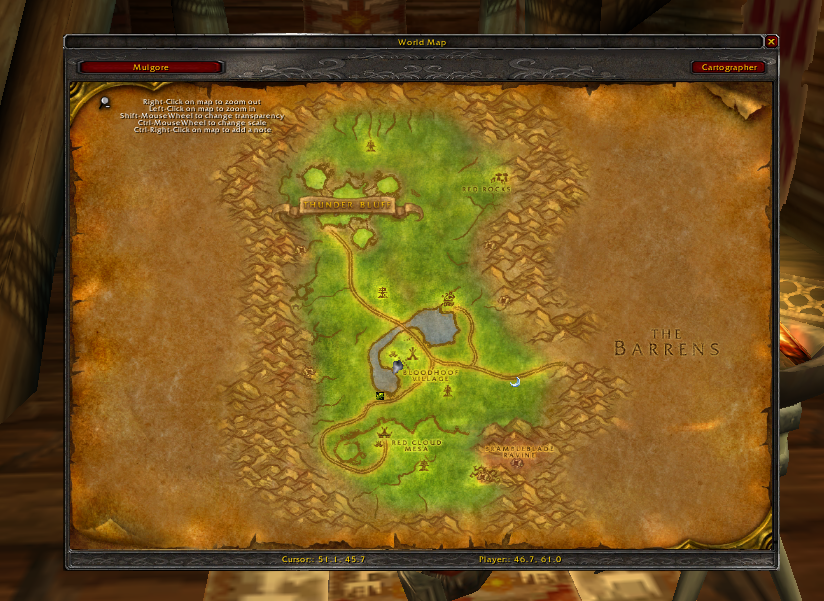
Cartographer is a comprehensive map enhancement addon that removes unexplored fog of war, adds instance maps, coordinate displays, and note markers to your World of Warcraft world map.

Categorized under Map & Minimap, this addon is a must-have for players seeking to improve their World of Warcraft experience on private servers.

Key Features

  • Fog of war removal revealing the entire continent map without needing to explore
  • Instance map overlays showing dungeon and raid layouts directly on the world map
  • Player and cursor coordinate display on the world map frame
  • Custom note pins you can place anywhere on the map with descriptions
  • Herb, mining, and treasure node integration for gathering route planning
  • Guild mate location tracking on the world map
  • Zone level range display for efficient leveling route planning
  • Modular plugin system so you load only the features you want

Why Cartographer is Essential

Navigating Azeroth without Cartographer means constantly alt-tabbing to external maps or wandering aimlessly. This addon puts dungeon layouts, gathering nodes, and custom waypoints directly onto your in-game map, saving hours of travel time and making exploration far more rewarding.

Supported Expansions

Cartographer is available for WotLK, Classic, and TBC. Whether you play on a Classic private server or a modern expansion realm, this addon enhances your gameplay across all supported versions.

How to Install Cartographer

Extract Cartographer and its library dependencies into your AddOns folder. Access settings through the world map options button or type /cartographer in chat.

Browse more WoW addons and find the best private servers on DivineTop.

Screenshots

Addon Information

CategoriesMap Minimap
DeveloperAnonymous
Downloads10
UpdatedMar 16th, 2026
ExpansionsVanilla, TBC, WotLK
TypeWoW Addon

Installing Cartographer on a private server

Which version do you need?

Private servers run older game clients, and an addon only loads properly on the client it was built for. Pick the download that matches your server's client. To check an addon you already have, open its .toc file: the ## Interface: line should match the number below.

ClientPatchInterfaceMore addons
Vanilla (Classic)1.12.111200Vanilla addons
The Burning Crusade2.4.320400TBC addons
Wrath of the Lich King3.3.5a30300WotLK addons

Install steps

  1. Download the Cartographer build for your client from the Downloads panel above.
  2. Extract the zip into Interface/AddOns inside your World of Warcraft folder. Create the AddOns folder if it doesn't exist yet.
  3. Check the folder name matches the .toc file inside it, for example AddOns/Cartographer/Cartographer.toc. Downloads from GitHub often add -master or -main to the folder name, which stops the addon from loading, and the 1.12.1 client is especially strict about this.
  4. Start the game and click AddOns on the character screen. Enable Cartographer, and tick Load out of date AddOns if it shows as out of date.

Lua errors right after installing almost always mean the build doesn't match your client. Delete the folder and download the version for your patch.

Where to use it

Popular WotLK 3.3.5a servers on DivineTop: Warmane Icecrown - WotLK PVP, Warmane Lordaeron - WotLK Blizzlike, UltimoWoW Bennu - WotLK Espanol. See all WotLK private servers.

Popular TBC 2.4.3 servers on DivineTop: BloodWoW - TBC Private Server, Warmane Onyxia - TBC PVE. See all TBC private servers.