BigWigs Bossmods

VanillaVanillaTBCTBCWotLKWotLKCataCataMoPMoPWoDWoDLegionLegionBfABfASLSLDFDF
10 downloads

Description

What is BigWigs Bossmods?

BigWigs Bossmods is a powerful boss encounter addon that delivers precise timers, proximity alerts, and phase-change warnings for every raid and dungeon boss in World of Warcraft.

Categorized under Combat, and Boss Encounters, this addon is a must-have for players seeking to improve their World of Warcraft experience on private servers.

Key Features

  • Precise ability timers with countdown bars for every boss mechanic
  • Proximity radar that warns when you are too close to other players during spread mechanics
  • Phase transition announcements with audio and visual cues
  • Modular plugin architecture letting you enable only the encounters you need
  • Voice pack support for spoken ability warnings during combat
  • Pull timer integration for coordinated raid-wide countdown
  • Lightweight codebase optimized for minimal CPU and memory usage
  • BerserkTimer module tracking enrage countdowns on every boss

Why BigWigs Bossmods is Essential

Raiding without BigWigs is like flying blind through a thunderstorm. The addon transforms chaotic encounters into manageable sequences by surfacing the exact information you need at the exact moment you need it. Healers can pre-cast before heavy damage, tanks can plan active mitigation, and DPS can maximize uptime by knowing exactly when to move.

Supported Expansions

BigWigs Bossmods is available for Dragonflight, BFA, MoP, WoD, Shadowlands, WotLK, Cataclysm, Legion, Classic, and TBC. Whether you play on a Classic private server or a modern expansion realm, this addon enhances your gameplay across all supported versions.

How to Install BigWigs Bossmods

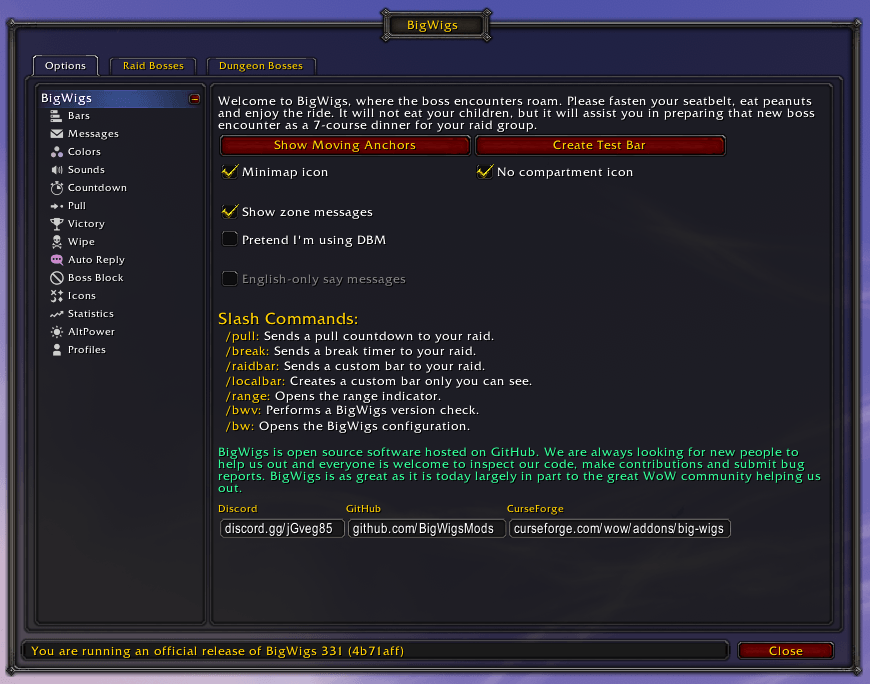
Drop the BigWigs folder and its LittleWigs companion into your AddOns directory. Type /bigwigs or /bw in chat to open the configuration panel and customize bar colors, sounds, and positioning.

Browse more WoW addons and find the best private servers on DivineTop.

Screenshots

Addon Information

CategoriesCombat, Boss Encounters
DeveloperAnonymous
Downloads10
UpdatedMar 16th, 2026
ExpansionsVanilla, TBC, WotLK, Cata, MoP, WoD, Legion, BfA, SL, DF
TypeWoW Addon

Installing BigWigs Bossmods on a private server

BigWigs Bossmods is made by Funkeh. DivineTop hosts copies built for older game clients so they work on private servers.

Which version do you need?

Private servers run older game clients, and an addon only loads properly on the client it was built for. Pick the download that matches your server's client. To check an addon you already have, open its .toc file: the ## Interface: line should match the number below.

ClientPatchInterfaceMore addons
Vanilla (Classic)1.12.111200Vanilla addons
The Burning Crusade2.4.320400TBC addons
Wrath of the Lich King3.3.5a30300WotLK addons
Cataclysm4.3.440300Cataclysm addons
Mists of Pandaria5.4.850400MoP addons
Warlords of Draenor6.2.460200WoD addons
Legion7.3.570300Legion addons
Battle for Azeroth8.380300BfA addons
Shadowlands9.2.790207Shadowlands addons
Dragonflight10.2.7100207Dragonflight addons

Install steps

  1. Download the BigWigs Bossmods build for your client from the Downloads panel above.
  2. Extract the zip into Interface/AddOns inside your World of Warcraft folder. Create the AddOns folder if it doesn't exist yet.
  3. Check the folder name matches the .toc file inside it, for example AddOns/BigWigsBossmods/BigWigsBossmods.toc. Downloads from GitHub often add -master or -main to the folder name, which stops the addon from loading, and the 1.12.1 client is especially strict about this.
  4. Start the game and click AddOns on the character screen. Enable BigWigs Bossmods, and tick Load out of date AddOns if it shows as out of date.

Lua errors right after installing almost always mean the build doesn't match your client. Delete the folder and download the version for your patch.

Where to use it

Popular WotLK 3.3.5a servers on DivineTop: Warmane Icecrown - WotLK PVP, Warmane Lordaeron - WotLK Blizzlike, UltimoWoW Bennu - WotLK Espanol. See all WotLK private servers.

Popular TBC 2.4.3 servers on DivineTop: BloodWoW - TBC Private Server, Warmane Onyxia - TBC PVE. See all TBC private servers.